
Choose the symptom
| Symptom | Try first | Avoid |
|---|---|---|
| Blank game area | Open the local game in its own tab. | Repeated reloads during a live run. |
| No sound | Click inside the game and check the mute controls. | Assuming a loaded document means audio has started. |
| Cramped controls | Rotate to landscape and use fullscreen. | Expecting forced orientation on every browser. |
| Progress missing | Check domain, browser profile and private mode. | Clearing site data before checking the cause. |
| Battle gone after reload | Start another run; check saved collection separately. | Expecting a live battle to resume. |
Does clearing wiki drafts delete my game?
The wiki’s own clear action only removes wiki drafts and manually marked ownership. Browser “clear site data” removes much more and can erase the game’s local progress.
How should I report a loading failure?
Include browser and device, the page address, whether the standalone game opens, and any visible error. Do not send passwords or private save files. Use the Contact page.
Rules: fixed game revision b297089. Local edition storage and loading behavior.
In the local game
Actual desktop browser captures from this local edition, 14 October 2026. Open an image for a larger view.
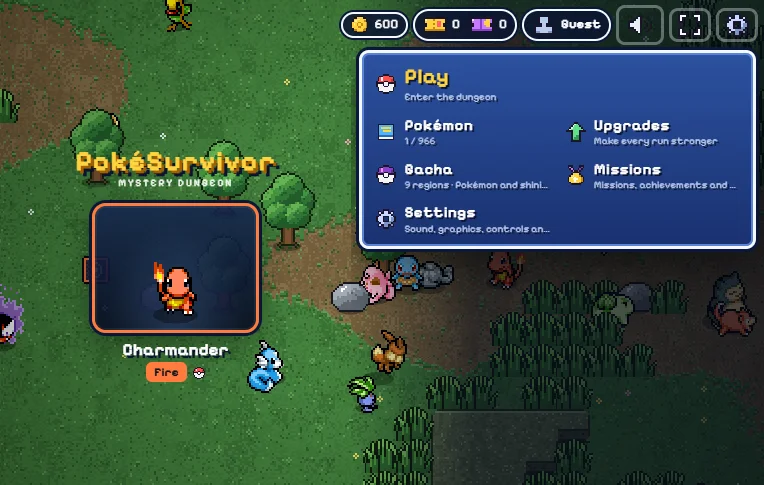
If the game is blank
Wait for the initial resources. An iframe load event only means its document loaded, not that the game successfully started. Use Open game for the same /game/ version in its own tab. Reload is manual and can interrupt a run.
If there is no sound
Browsers require a user gesture before audio begins. Click or tap inside the game, then inspect the speaker control and game settings. Device mute settings and background-tab suspension can also affect sound.
If touch controls feel cramped
Landscape gives the arena and controls more space. Drag to move and tap a move slot to switch. The wrapper offers fullscreen with an immersion fallback. It does not force orientation; exit immersion with the visible control.
Game host and older saves
New sessions run on s.pokemonsurvivor.wiki. Saves previously created on pokemonsurvivor.wiki remain at the older game entry linked below; they are not automatically transferred. Do not clear either site’s browser data. Partner-site embeds may use separate browser storage, so return to the same website and browser profile to continue.
If progress appears missing
Verify you are on the same domain and browser profile. Private browsing, blocked storage, clearing site data or another device can remove or separate progress. This edition adds a persistent guest save, which differs from the upstream memory-only guest flow.
What can be exported
Saved exports wiki builds and manually marked owned Pokémon only. It does not export the game’s save. Never clear all browser storage to troubleshoot a planner issue; the wiki’s Clear button removes only its own pswiki keys.
Common mistakes & limits
- Browser or operating-system tab eviction can interrupt a running game.
- Desktop browser entry has been checked; complete-run and real mobile-device compatibility are still awaiting acceptance.
- If storage is full or blocked, you can continue playing but progress may not persist.
Sources and next steps
Reviewed against JPTER78’s fixed game source and the author’s guide. Evidence: source-checked rules. Desktop checks cover navigation, partner selection, a short run, pause, results and persistence after reload; long-run and real-device validation are still pending.